

Document Archiving Solutions: Secure, Compliant, and Searchable Records for the Enterprise
Key Takeaways
- A document archiving solution is not a file share or a backup. It is policy-driven retention, immutability where needed, auditability, and fast search.
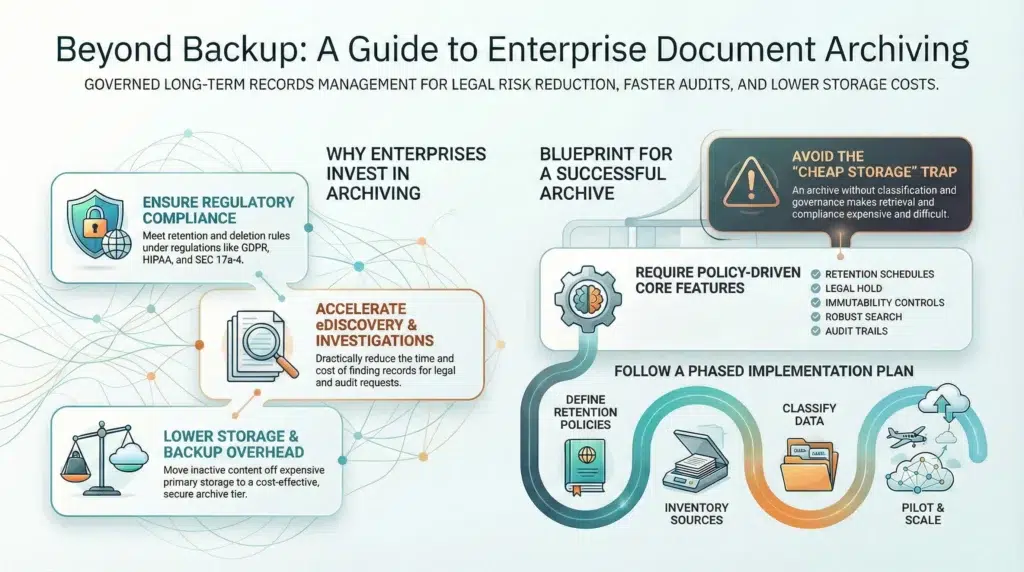
- Enterprises adopt archiving to reduce legal risk, accelerate audits and eDiscovery, and lower active storage and backup load.
- Choose solutions that align with your retention schedules, legal hold requirements, security controls, and integrations across content sources.
- Implementation succeeds when governance leads: retention policy, classification, indexing, and operating procedures before migration volume.
What is a document archiving solution
A document archiving solution is a governed system for long-term preservation of business records that must remain secure, searchable, and defensible over time. It applies policy to the document lifecycle: ingest, classify, retain, place on legal hold, audit access, and delete when retention expires.
Quick definitions (for clarity):
- WORM means write once, read many. It is a control model used to prevent records from being modified or erased.
- RBAC means role-based access control. It ensures only authorized roles can access certain document classes.
- eDiscovery means electronically stored information discovery, used to identify and produce records for legal matters.
In practice, archiving should reduce operational friction. People should be able to find the right version of the right record fast, and compliance should be able to prove retention and chain-of-custody without heroic effort.
Why enterprises invest in document archiving
1) Compliance and retention
Retention requirements vary by industry and geography. For example, privacy and deletion obligations under GDPR (including the right to erasure in Article 17) require controlled retention and defensible deletion, not uncontrolled sprawl. Healthcare organizations must protect electronic protected health information under the HIPAA Security Rule with administrative, physical, and technical safeguards. Financial services recordkeeping rules may require immutability controls or auditable reconstruction of records, depending on the rule and retention class.
2) eDiscovery and investigations
When litigation hits, the worst time to discover that your records are scattered across file shares, SaaS silos, and employee laptops is day one of a legal hold. Strong archives reduce time-to-collection, improve defensibility, and lower outside counsel and review costs.
3) Lower storage and backup overhead
Archiving reduces pressure on primary storage and backup windows by moving inactive content to the right tier with the right access controls. Backups are still critical, but backups are not designed to be long-term governed record repositories.
4) Governance and analytics readiness
Archives can support governance programs that span retention, security, and audit. When record types are consistently classified and indexed, organizations can also improve search and knowledge reuse without exposing sensitive data.
Core features to require in document archiving solutions
- Policy-driven retention: retention schedules by record type, region, and sensitivity, plus defensible deletion when retention expires.
- Legal hold: preservation that overrides deletion, with clear workflows and reporting.
- Immutability and auditability: WORM-style controls where required, or auditable record history where that is acceptable.
- Indexing and search: full-text indexing and metadata filtering across large volumes.
- Security controls: encryption at rest and in transit, RBAC, and comprehensive audit logs.
- Integrations: connectors and APIs for file shares, content repositories, collaboration platforms, and line-of-business apps.
- Operational reporting: retention exceptions, legal hold status, access reporting, and evidence-ready audit packs.
Common mistake to avoid
Treating an archive as “cheap storage” usually fails. If records are not classified, indexed, and governed, storage might be cheaper, but retrieval and compliance become expensive.
Cloud vs on-prem vs hybrid archives
| Model | Best for | Strengths | Tradeoffs |
|---|---|---|---|
| Cloud archive | Distributed teams, rapid scale | Elastic capacity, faster rollout, easier global access | Requires careful security and data residency controls |
| On-prem archive | Strict residency or legacy constraints | Local control, proximity to legacy systems | Capacity planning, upgrades, and operational overhead |
| Hybrid archive | Mixed constraints and gradual modernization | Control for sensitive classes, cloud scale for everything else | Integration complexity without a unified governance layer |
A mini scenario (what usually breaks first)
A global manufacturer receives an audit request: “Provide all QA sign-off documents, supplier certifications, and change approvals for product line X from 2019–2022.” The documents exist, but are spread across a SharePoint site, an aging file server, and individual email attachments.
Without archiving, the response becomes a manual hunt, with missing items and no chain-of-custody. With a document archiving solution, the organization can:
- search a unified index across repositories
- filter by record type and date range
- export an evidence pack with audit logs and access history
- prove retention policy enforcement without ad hoc work
How to implement a document archiving solution (step-by-step)
- Define requirements and retention schedules. Map laws, regulations, and internal policies to record classes and retention periods. Document legal hold triggers and exceptions.
- Inventory content sources. Include file shares, ECM systems, collaboration platforms, and line-of-business applications. Decide what is in scope for phase 1.
- Design classification and metadata standards. Make classification consistent across departments. Decide which metadata fields are mandatory for retrieval and audit.
- Validate security and audit controls. Ensure encryption, RBAC, audit logs, and evidence reporting meet your governance standards and risk posture.
- Build indexing and search workflows. Optimize for the people who will use the archive: legal, compliance, audit, records management, and operations teams.
- Pilot, measure, and then scale. Start with one department, tune policies and search, then migrate in phases. Establish quarterly reviews for retention and governance.
Document archiving solutions: vendor comparison checklist
| Criteria | What to ask | Why it matters |
|---|---|---|
| Retention + deletion | Can retention be enforced by record type, region, and sensitivity? Is deletion defensible and logged? | Compliance depends on consistent, provable enforcement. |
| Legal hold | How are holds created, managed, reported, and released? Does hold override deletion automatically? | Holds are a high-risk area and must be operationally reliable. |
| Immutability | Do you support immutable storage controls where required? Is there an audit trail alternative where appropriate? | Some record classes must be protected from tampering. |
| Search and indexing | Do you index full text and metadata? How fast can you search at scale? | Archives fail when retrieval is slow or unreliable. |
| Security | Encryption, key management, RBAC, audit logs, and monitoring. What certifications or alignment exist? | Archives often contain your most sensitive records. |
| Integrations | Which repositories and apps are supported out of the box? Is there an API for custom sources? | Coverage gaps become compliance gaps. |
| Reporting | Can you generate audit packs, retention reports, and access logs on demand? | Audits should not require custom scripts. |
Where Solix fits (principle-first)
A modern archive should behave like a governance layer, not just a storage destination. The winning pattern is consistent across industries: policy-driven lifecycle management, centralized search, audit-ready reporting, and integration across content sources.
Solix approaches archiving as part of a governed information lifecycle. That means organizations can implement retention schedules, legal hold workflows, and searchable indexing across large volumes, while keeping security and audit requirements first.
Next step: If you want a quick evaluation framework, start with two questions: (1) Which record classes have the highest regulatory risk? (2) Which repositories cause the most retrieval pain during audits? Then map those to a phase-1 archive rollout.
Learn more about Solix: Solix Technologies
Compliance and standards references (starting points)
- GDPR (EU General Data Protection Regulation): Official text on EUR-Lex, including Article 17 (right to erasure). EUR-Lex GDPR
- HIPAA Security Rule: U.S. HHS overview and guidance for safeguarding electronic protected health information (ePHI). HHS HIPAA Security Rule
- SEC recordkeeping (Rule 17a-4 context): eCFR rule text and SEC guidance on electronic recordkeeping requirements and formats. eCFR 17 CFR 240.17a-4 SEC overview
- NIST SP 800-88r2 (Media Sanitization): Useful for defensible disposal and end-of-life data handling. NIST SP 800-88r2 PDF
- ISO/IEC 27001: The best-known ISMS (information security management system) standard overview. ISO 27001 overview
FAQ
What is the difference between archiving and backup?
Backup supports recovery from loss and operational continuity. Archiving supports long-term retention, auditability, immutability where required, and fast search and retrieval.
Do we always need immutable storage?
Not always. Some record classes require strong tamper resistance. Others can be protected through controlled access and complete audit trails. The right approach depends on regulatory requirements and your risk model.
How do we set retention periods?
Start with regulatory requirements and contracts, then add internal governance rules. Implement retention by record type, geography, and sensitivity, and enforce defensible deletion after retention expires.
What should we index for eDiscovery?
Index metadata (record type, owner, dates, business unit, case or project IDs) plus full text where permitted. Preserve access logs and version history to support chain-of-custody.