

Drivers for Application Retirement (Application Sunsetting)
Enterprise portfolios rarely shrink on their own. Systems linger, licenses pile up, and skilled admins become harder to find. For organizations focused on cloud data management, enterprise intelligence, and data governance, the path forward is to rationalize what stays, what modernizes, and what retires. This blog explores the key drivers propelling this shift, empowering you to optimize your IT ecosystem for cloud data management and enterprise intelligence.
Legacy applications are aging systems largely removed from active use and retained mainly for occasional lookups and compliance reporting. They no longer align with any of the current business needs or technological standards. These systems are typically characterized by obsolete technology stacks, dwindling support resources, and incompatibility with modern platforms. Contrary to common perception, legacy applications aren’t necessarily non-functional—many remain operational but create mounting challenges for organizations seeking agility and efficiency.
Application retirement (application sunsetting) is the planned decommissioning of a system while preserving its business records in an accessible, compliant archive. You eliminate technical debt and associated risk, retain the data (often with legal hold and retention controls), and enable secure self-service access—for audit, analytics, and continuity. By retiring redundant apps, companies can redirect their budgets toward innovative solutions, such as AI-driven analytics and cloud-native architectures—core to Solix’s portfolio.
Key Drivers for Application Retirement
Before listing the drivers, it’s worth noting the macro context: leaders are reallocating budgets toward modernization and AI while simplifying vendor estates and closing skills gaps. Forrester highlights the growing weight of technical debt, while Gartner shows consolidation and cloud adoption accelerating, and IDC quantifies the global skills crunch. Together, these trends make a compelling case for retiring low-value, high-risk legacy apps and retaining only the data you need—soundly governed and instantly usable. Below, we delve into nine key drivers, backed by analyst insights, highlighting why now is the time to act.
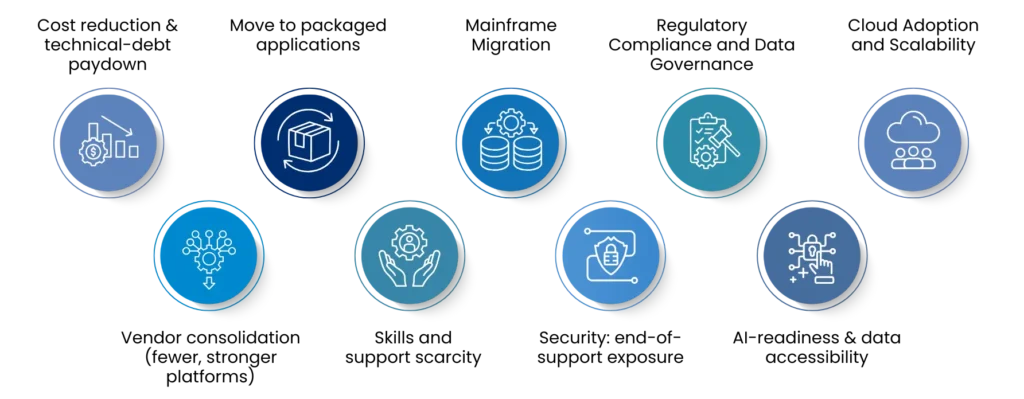
1. Cost reduction & technical-debt paydown
Forrester’s Q2 2024 Tech Pulse Survey shows that just 21% of US IT leaders report being free from major technical debt. Nearly half are dealing with moderate levels, while 30% face serious or critical debt. This burden—shaped by past choices, tight deadlines, and external pressures—limits progress on new initiatives. Like financial debt, technical debt grows over time, demanding more resources to fix and slowing down innovation and resilience, including security.
Forrester recommends dedicating ~20% of portfolio spend to addressing technical debt—otherwise you “won’t get there.” That spending is easier to free when you sunset systems with low business value and high run costs.
2. Vendor consolidation (fewer, stronger platforms)
Since 2005, Oracle has emerged as the leading enterprise software consolidator, acquiring 43 applications to expand its portfolio. Major additions include PeopleSoft, JD Edwards, Siebel (CRM), Agile Software (PLM), and Retek (Retail). In contrast, SAP has primarily focused on building its ERP stack in-house, while Infor has expanded its enterprise management platform through acquisitions of smaller vendors, including BaaN, e.piphany, GEAC, SSA Global, Extensity, and Systems Union. Organizations running these acquired applications must now assess whether to remain on the consolidated platform or transition to a new vendor.
SaaS portfolios are shrinking (e.g., average apps fell 5% YoY), signaling a deliberate move to fewer, strategic platforms. As organizations standardize on core suites, they decommission overlapping SaaS and, critically, retire legacy “side-car” systems that existed only to integrate or backfill gaps. This reduces license and integration overhead, lowers audit scope, and frees budget for modernization.
3. Custom-built → Modular ERP → SaaS & Low-code platforms
From in-house builds ➜ to modular enterprise suites (ERP, SCM, CRM) or to cloud-based, agile platforms (SaaS and LCAPs): For decades, enterprises have shifted from custom systems to packaged, modular architectures—with vendors like SAP and Oracle setting the template and expanding capability through add-on modules. Today’s phase layers in SaaS and low-code platforms further reduce the need for one-off ‘side-car’ tools. The practical next step is portfolio cleanup: modernize what aligns with the target platform and retire legacy, non-modular apps, keeping their data accessible for audit and analytics.
Reports say that by the end of 2025, around 70% of new applications built by organizations will rely on low-code or no-code technologies—an impressive jump from less than 25% in 2020. As teams assemble capabilities on standardized SaaS and low-code application platforms (LCAPs), bespoke legacy apps become redundant. Organizations consolidate onto a few strategic platforms, retire the long tail of custom tools, and preserve historical records in a compliant archive for audit and analytics.
4. Skills and support scarcity
IDC forecasts that by 2026, 90%+ of organizations will feel the impact of the IT skills crisis, costing $5.5T in cumulative losses. If a system’s talent pool is evaporating (older ERPs, 4GLs, bespoke apps), retiring it removes an operational risk. Today’s tech workforce is increasingly centered around emerging fields such as AI, cloud computing, and data science. Meanwhile, a generation of mainframe specialists is retiring, leaving behind a shrinking pool of experts. Most new computer science graduates have little exposure to legacy languages like COBOL or Natural and are unfamiliar with the hierarchical databases that power traditional mainframes. By modernizing their systems, organizations can tap into modern skill sets and reduce dependence on an aging, outdated talent base.
5. Mainframe Migration
Mainframes continue to play a mission-critical role in 2025, with 92% of organizations viewing them as essential for long-term growth. They offer unmatched reliability, security, and performance for industries like banking, insurance, and government. However, rising maintenance costs, a shrinking pool of COBOL-skilled engineers, and limited business agility are pushing enterprises toward modernization. Legacy systems struggle to integrate with cloud platforms, AI, and analytics, hindering innovation and digital transformation. Additionally, compliance and vendor lock-in concerns add to the urgency. As a result, organizations are increasingly exploring migration strategies to enhance flexibility, reduce costs, and enable real-time data access across modern architectures.
6. Security: end-of-support exposure
Legacy systems don’t get security or performance updates, which steadily widens your exposure window and increases the chance of a breach. The most pragmatic response is to sunset end-of-support/end-of-life applications and move only the business records into a compliant, searchable archive. Doing so shrinks the attack surface, eliminates unpatchable components, and simplifies monitoring. You keep what matters—immutable records with legal hold, audit trails, and role-based access—while turning off what doesn’t: vulnerable runtimes, orphaned integrations, and idle servers. The result is lower risk, lower TCO, and cleaner compliance.
7. Regulatory Compliance and Data Governance
For legacy applications that are rarely used—or not used at all—regulations (GDPR, CCPA, HIPAA, SOX) still require you to retain and retrieve historical records. Application retirement lets you decommission the system while preserving its data in a governed, immutable archive with retention policies, legal hold, and full audit trails. Teams get fast eDiscovery without keeping the app online. This approach enforces data minimization, reduces breach exposure and audit scope, and avoids non-compliance penalties.
8. AI-readiness & data accessibility
Generative AI needs governed, unified, high-quality data—not brittle, siloed apps. By 2026, over 80% of enterprises will use GenAI. Retiring legacy applications is the shortest path to AI-ready data: extract and validate historical records, harmonize schemas, enforce lineage/masking/legal hold, and land them in a governed archive or lakehouse/feature store. From there, publish permissioned tables, features, and embeddings through APIs to support fine-tuning, RAG, and agent workflows—improving model accuracy, explainability, and reducing run costs, while accelerating AI delivery.
9. Cloud Adoption and Scalability
Cloud adoption and scalability are powerful drivers to retire legacy systems that can’t operate reliably in modern environments. As organizations shift to cloud-first and hybrid architectures, decommissioning incompatible on-prem applications reduces data-center footprint, streamlines operations, and lowers run costs.
According to Gartner, by the end of 2025, more than 85% of organizations will adopt a cloud-first approach, and more than 50% will use industry cloud platforms by 2028. Companies that fail to embrace cloud-native architectures will struggle to fully execute their digital strategies. Moving to cloud-native platforms enables digital and product teams to leverage the scalability, flexibility, and innovation built into modern cloud environments.
How Solix helps (in brief)
Solix Technologies provides comprehensive application retirement solutions that help organizations archive critical data, maintain regulatory compliance, and achieve significant cost savings. Our expertise spans legacy system decommissioning across multiple platforms, including Oracle, SAP, mainframe systems, and custom enterprise applications.
Solix brings the portfolio needed to retire safely and unlock value: application retirement & enterprise archiving (preserve EBRs with legal hold/immutability), data governance & intelligent classification (policy-driven retention), data masking & privacy (safe test/analytics use), email/file archiving (holistic records), and enterprise AI & lakehouse access patterns for analytics on archived data.
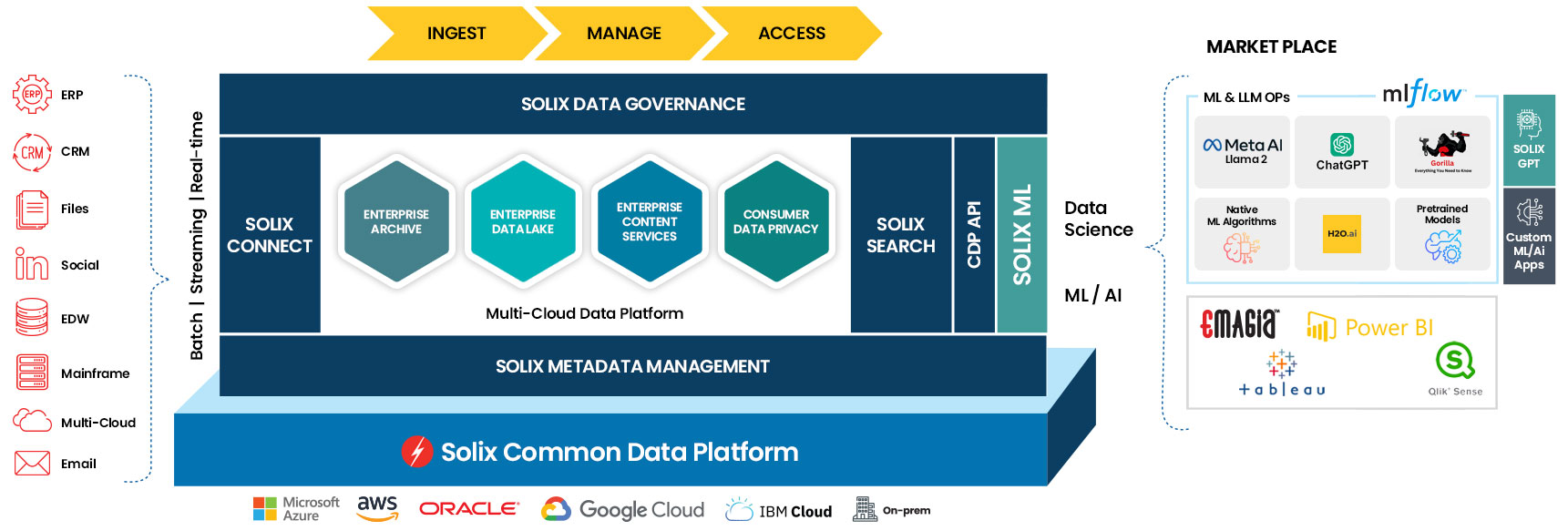
If you’re weighing sunsetting candidates, start with cost-to-serve, supportability, and regulatory exposure, then design a retirement plan that validates data integrity, preserves context, and provides secure self-service access for auditors and business users.
Read more:
Want the numbers behind app retirement? From Liability to Leverage walks through risk, TCO, NPV, multi-year ROI, and how Solix turns each decommission into budget for the next. Read Part 1 (why it can’t wait) and Part 2 (the model + rollout).