
7 R’s of Cloud Migration: How Solix Powers Effective Cloud Transformation
According to Gartner, global spending on public cloud services is expected to hit around $723 billion by 2025 and surpass $1 trillion by 2027. Yet only 30% of organizations have clear visibility into their cloud budget allocation. This disconnect highlights a critical challenge: companies are pouring money into cloud migrations without really thinking through which apps should move, which should stay put, and which should just be retired. Getting this decision right isn’t just about saving money upfront—it shapes whether you’ll actually gain a competitive edge down the line.”
This asset analyzes the “7 Rs” framework in cloud migration and offers a sharp product perspective on how the Solix Application Retirement solution powers seamless transitions for modern enterprises.
Understanding Migration Strategy: The Foundation of Cloud Success
A cloud migration strategy is really about figuring out the best way to move your apps, data, and infrastructure from on-premises environments to cloud platforms. There’s no single approach that works for everything—you need to look at each workload on its own terms, weighing factors like technical requirements, how critical it is to the business, and what you’re trying to achieve strategically.
“The whole point of having a clear migration strategy is to navigate the trade-offs—do you prioritize speed or take time to optimize? Do you minimize costs or invest in better capabilities? What about short-term needs versus where you want to be in five years? Without some kind of framework to guide these decisions, you’re likely to blow your budget, create security gaps, or cause major disruptions to day-to-day operations. The 7 Rs model provides this essential structure, offering multiple pathways tailored to different application scenarios by addressing aspects like assessment and planning, risk assessment and mitigation plans, change management and training, and data and application migration.
Cloud Migration vs. Cloud Transformation: Defining the Spectrum
Cloud migration refers specifically to the process of relocating existing digital assets—applications, data, and infrastructure—from on-premises environments to cloud platforms. The primary objective involves replicating current capabilities while leveraging cloud infrastructure to improve scalability and reduce operational overhead and capital expenditure.
Cloud transformation, on the other hand, goes much deeper. It’s about actually modernizing your applications—reworking their structure, optimizing their performance, and redesigning their architecture. You’re not just moving things; you’re rebuilding them to take full advantage of what the cloud offers: microservices, serverless functions, automatic scaling, DevOps workflows, and all that.
Where migration might ask, “How do we move this workload?”, transformation asks, “How should this business function operate in the cloud era?” This distinction is crucial—migration is often a component of transformation, but not all migrations are transformational in nature. Migration projects typically yield results faster and require less upfront investment. Transformation takes longer and costs more initially, but tends to pay off better in the long run.
Evolution of the R Models: From Gartner’s 5 Rs to AWS’s 7 Rs
The taxonomy of cloud migration strategies has advanced considerably over the past decade. In 2010, Gartner introduced the 5 Rs model as a decision framework for application migration. The original strategy included Rehost, Refactor, Revise, Rebuild, and Replace. This model provided IT leaders with a structured way to evaluate migration options based on what each application did and what the business actually needed.
As cloud adoption accelerated, AWS expanded this framework first to 6 Rs (adding Retire) and subsequently to 7 Rs (adding Retain). These additions acknowledged two critical realities: first, that not all applications should be migrated, and second, that some applications might not be migrated immediately. The expanded framework provided a more comprehensive set of options for enterprise portfolios, which typically comprise hundreds of applications with varying levels of criticality and cloud readiness.
The evolution continues as cloud providers introduce new services and migration patterns. For example, AWS recently announced Mainframe Modernization and Migration Hub Refactor Spaces specifically to address two of the most challenging migration scenarios: mainframe applications and complex refactoring projects.
Mastering the 7 Rs: Comprehensive Cloud Migration Strategies
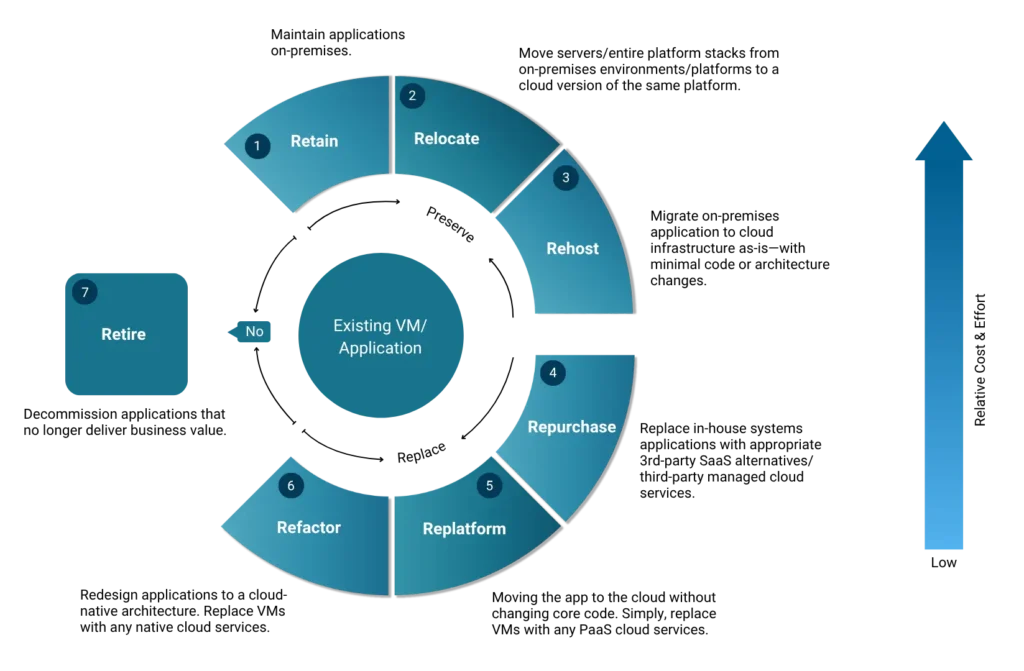
Retire (Stop Using)
- Strategic Purpose: Decommission applications that no longer deliver business value or consume disproportionate resources relative to their contribution.
- Implementation Approach: A Comprehensive application portfolio assessment identifies redundant, obsolete, or vendor-unsupported systems. These applications undergo a controlled shutdown, preserving data and ensuring adherence to compliance.
- Business Impact: According to Forrester research, retiring legacy systems can reduce hardware and operational costs by up to 65% while eliminating ongoing maintenance expenses and security vulnerabilities.
Retain (Strategic On-Premises Maintenance)
- Strategic Purpose: Put it on hold and look at it again later! Maintain applications on-premises when cloud migration presents a higher risk or cost than on-premises optimization.
- Implementation Approach: Enterprises often retain a workload when it depends on another system that must migrate first, offers limited business value for immediate migration, or if the vendor plans to release a SaaS version in the future. Applications remain in current environments while the organization addresses dependencies, regulatory requirements, or performance considerations that make cloud migration inadvisable.
- Business Impact: Preserves investment in optimized on-premises infrastructure while avoiding premature migration costs for applications that don’t benefit from cloud capabilities.
Rehost (Migrate without modification)
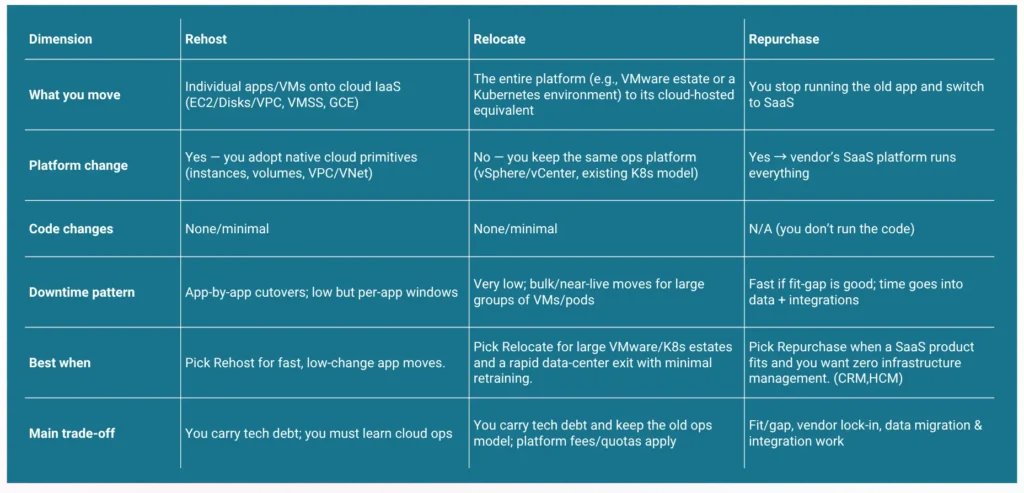
- Strategic Purpose: Migrate applications with minimal changes. Migrate on-premises application to cloud infrastructure as-is—with minimal code or architecture changes—to achieve speed, reduce data center risk, and create a stable landing zone for later optimization (replatforming/refactoring). Ideal when deadlines (such as lease expiry, M&A, or hardware refresh) or resourcing constraints require a low-change, low-risk migration.
- Business Impact: This approach migrates application data and workflows to cloud services that are compatible with existing storage, networking, and compute needs. As workloads retain their original configurations, rehosting is straightforward and ideal for enterprises without cloud-native expertise. Delivers fast time-to-cloud with minimal disruption and low change risk; converts CapEx to OpEx and can lower run costs with right-sizing and commitments.
Relocate (Virtual Machine–Based Migration)
- Strategic Purpose: This strategy migrates workloads without impacting ongoing operations, modifying source code, or adding new hardware. It enables enterprises to move servers/entire platform stacks from on-premises environments/platforms, such as Kubernetes or VMware, to a cloud version of the same platform (e.g., managed Kubernetes services like GKE — Google Kubernetes Engine and EKS — Amazon Elastic Kubernetes Service).
- Business Impact: Accelerates at-scale migration with near-zero retraining and low change risk; avoids new hardware purchases and keeps operations consistent. Costs can be more predictable but may be higher per host due to platform subscriptions; cloud-native benefits are limited on day one, with modernization (PaaS/serverless/managed DBs) available as a follow-on phase.
Repurchase (Drop-Off & Shop)
- Strategic Purpose: The repurchase strategy replaces in-house systems with third-party managed cloud services, enabling organizations to retire legacy applications and adopt a consumption-based SaaS model that aligns IT costs with revenue. Since these services are maintained by external providers, the approach significantly reduces the internal operational workload.
- Business Impact: Reduces operational burden (patching, backups, HA) and shifts spend to predictable subscriptions; improves user experience and release cadence via vendor-delivered features; speeds migration by configuring rather than rebuilding—while introducing vendor-dependency considerations and the need for strong integration and data-exit plans.
Replatform (Lift, Optimize, and Shift)
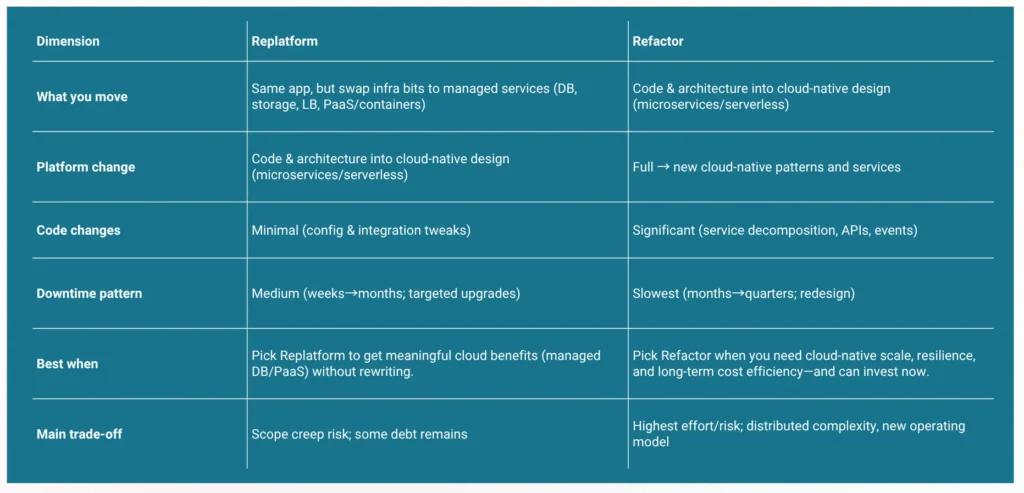
- Strategic Purpose: Enhance resilience, performance, and operations by moving the app to the cloud without changing core code while swapping supporting components for managed services (e.g., managed DB, object storage, autoscaling PaaS/containers).
- Strategic Purpose: Enhance resilience, performance, and operations by moving the app to the cloud without changing core code while swapping supporting components for managed services (e.g., managed DB, object storage, autoscaling PaaS/containers)
Refactor (Re-architect)
- Strategic Purpose: Redesign applications to cloud-native architecture (microservices, event-driven, serverless/containers) for elastic scale, higher reliability, and long-term efficiency aligned to product roadmaps.
- Business Impact: Maximizes cloud benefits—autoscaling, faster releases, improved uptime, and lower unit costs at steady state. Requires the highest upfront investment (skills, time, change management) but yields a future-proof platform and reduced operational burden over time.
Drawing Parallels: In the Real World
Retire: A regional bank sunsets 100+ internal workflow apps built on an early-2000s collaboration platform. Before shutdown, it exports records into a governed archive with immutability and legal hold so audits can still retrieve evidence. Result: license/support savings and a smaller attack surface. Analogy:You empty a storage unit full of old stuff, keep the important documents in a secure vault, and close the unit to stop paying rent.
Retain: A manufacturer keeps its plant-floor control system on-prem because it needs millisecond latency to production lines and is certified under strict safety rules. The team hardens backups, patches, and network segmentation now, and schedules a revisit at the next hardware refresh. Analogy: One room in your old house stays as-is because it’s tied to the neighbor’s power line. You leave it intact for now and plan to move it when the dependency is gone.
Rehost: A healthcare provider moves its claims processing app from on-prem VMs to cloud virtual server (AWS EC2) with equivalent block storage and firewall rules—no code changes. They use AWS Application Migration Service to replicate disks, cut over during a weekend, then right-size instances and apply long-term usage discounts to control cost. Analogy: You pack your furniture and move it into a new apartment. Same furniture, new address. You’ll learn the new building’s rules later.
Relocate: A retailer migrates 800+ virtual machines by moving its entire virtualization platform into a cloud-hosted version of the same platform. Operations keep the same console and runbooks, private connectivity is set up to headquarters, and migrations happen in waves with minimal downtime. Analogy: A crane lifts your entire floor—hallways, wiring, elevator—and sets it in a new building. Inside, everything works the same on day one.
Repurchase: A global services firm replaces its custom on-prem CRM with Salesforce. They migrate account/opportunity data, re-implement workflows using built-in automation, and integrate with ERP via APIs. Infra/patching work disappears; feature velocity increases with three Salesforce releases per year. Analogy: You sell your old car and switch to a chauffeured subscription. You still get around, but someone else maintains the vehicle.
Replatform: A media company moves its Java app from VMs to Azure App Service and the database from self-managed SQL Server to Azure SQL (PaaS). They add Azure Front Door + CDN and Redis cache. Code stays the same, but uptime improves (multi-AZ), ops toil drops (managed backups/patching), and autoscaling handles traffic spikes. Analogy: You move in and upgrade to smart appliances—central AC, smart thermostat, efficient oven—without changing the floor plan.
Refactor: An e-commerce player breaks a monolithic storefront into microservices: catalog, cart, checkout, and payments. Services run on Kubernetes (or serverless for bursty tasks), communicate via a queue, and use separate managed databases. They add an API gateway, CI/CD, and observability. Result: independent deployments, elastic scale on sale days, lower MTTR, and better cost per transaction over time. Analogy: You knock down walls and rebuild the house with modular rooms, new wiring, solar, and better insulation—bigger project, future-proof result.
The 7 Rs, One Playbook: Cut Cost and Risk with Solix
Below is a practical, “pick any R and go” view of how Solix’s portfolio slots into each migration strategy so you can move faster, lower risk, and keep regulated data accessible—without dragging legacy baggage along.
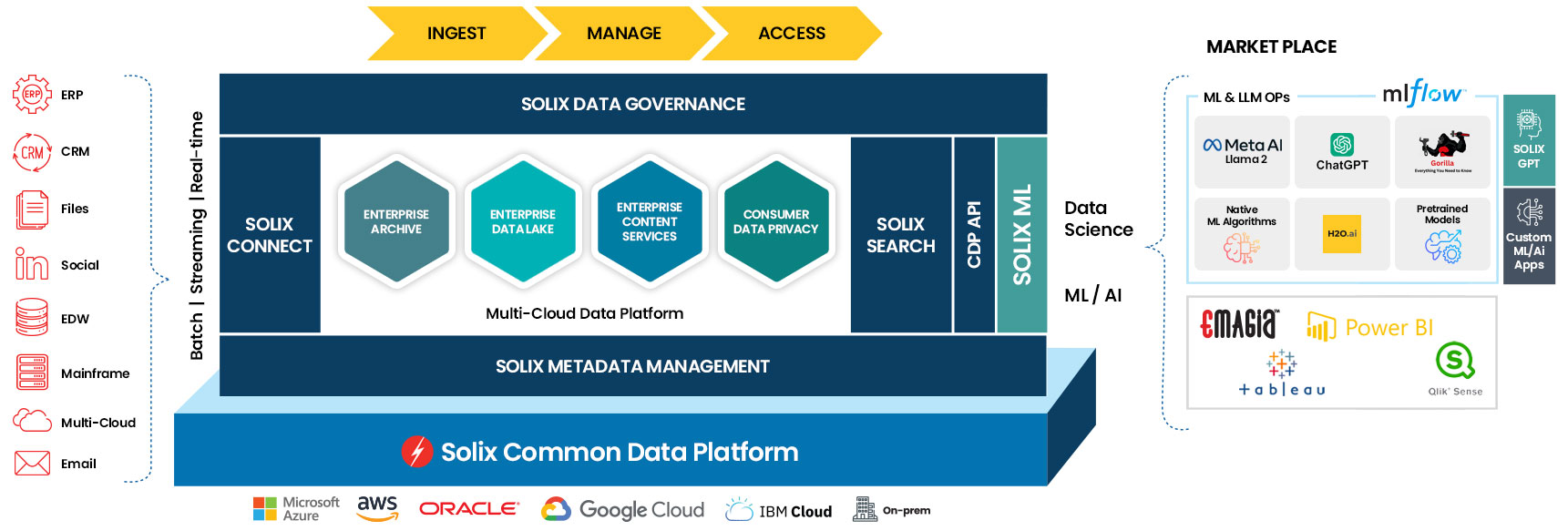
- Retire – Use Solix Enterprise Archiving on the Solix Common Data Platform (CDP) with Solix ECS to extract and preserve full business context, apply Data Governance (retention, legal hold, audit, WORM), and route records via Sensitive Data Discovery + Intelligent Data Classification; shut down legacy apps with Solix Application Retirement while keep history searchable, and let teams find answers with Enterprise AI (EAI) + Solix GPT/ML without ever resurrecting the old system.
- Retain – While a workload stays on-prem, govern it with CDP + Data Governance (policies, holds, audit) and continuously reduce risk/footprint using Sensitive Data Discovery and Intelligent Data Classification to identify PII/PHI and over-retention; offload cold data with Solix Enterprise Archiving/ECS for cheaper storage, mask non-prod with Data Masking, and keep business users productive via cross-repository search powered by EAI/GPT/ML.
- Rehost – Before moving VMs, profile and segment with Sensitive Data Discovery + Classification to decide what to archive, then offload historical rows/files using DataSolix Enterprise Archiving to CDP/ECS so instances are right-sized; execute cutover, keep compliance intact with Data Governance, protect test environments with Data Masking, and provide unified access to current (rehosted) and historical (archived) data through Enterprise Archiving views and EAI/GPT natural-language search.
- Relocate – For VMware/K8s estates, shrink host counts by archiving history first via Solix Enterprise Archiving into CDP/ECS, enforce consistent retention and legal holds with Data Governance, validate sensitive data posture with Sensitive Data Discovery, and maintain user continuity with EAI/GPT search so relocated platforms carry only hot data while history remains governed, searchable, and cheap.
- Repurchase – When switching to SaaS, decommission the legacy app with Application Retirement while CDP + Database/Email/File Archiving preserve complete, queryable history outside SaaS limits; ensure policy alignment using Data Governance, cleanse/mask during migration with Sensitive Data Discovery + Data Masking, and deliver one pane of glass across SaaS + archive via EAI/GPT so users get historical context without bloating the new tenant.
- Replatform – Keep code but modernize infra by moving history to CDP/ECS with Solix Enterprise Archiving to slim DBs and shares before adopting managed services; apply Data Governance for consistent retention/audit across old and new, use Sensitive Data Discovery + Classification to verify PII placement, safeguard dev/test with Data Masking, and expose historical insights alongside the replatformed app through its enterprise archiving UX and EAI/GPT search/summarization.
- Refactor – Enable the strangler pattern by offloading legacy history to Enterprise Archiving on CDP/ECS so new microservices own only hot data; govern service-level retention, lineage, and access via Data Governance, re-classify sensitive fields with Sensitive Data Discovery + Intelligent Classification, protect synthetic test datasets with Data Masking, and accelerate product and ops with EAI/GPT for semantic search, entity linking, and summarization across services and the governed archive.
The Solix Advantage (why one partner for all 7)
- Discover → Classify → Govern → Archive → Access on one platform: fewer moving parts, faster time-to-value.
- Metadata-driven discovery & classification to know exactly what you have before you move it.
- Context-preserving archives that keep data usable after you turn the app off.
- Self-service search, eDiscovery, and reporting so that business, audit, and legal stay productive post-cutover.
- Compliance-first (Policy-based ILM/retention, legal hold, audit, WORM) without slowing delivery for compliance-first migrations.
- Open access & export formats (PDF/CSV/JSON/XML, etc.) to integrate with BI, eDiscovery, or regulators.
- APIs & automation hooks to plug into your migration factory, change management, and reporting.
- Security everywhere (masking, RBAC, encryption, KMS) from dev/test to production to archive.
- AI-assisted productivity (EAI, GPT/ML) so users get answers, not just storage.
- Proven cost takeout: license, infra, and admin savings from decommissioning—without losing access to what regulators and the business still need.
No matter which “R” you choose for each workload, Solix gives you a consistent backbone to move less data, migrate faster, reduce risk, and keep history accessible and compliant.
The Takeaway: Choose the Right R, Reduce the Risk
Cloud migration is a portfolio decision, while cloud transformation is an operating-model shift—and the “7 Rs” bridge the two. From Gartner’s foundational 5 Rs to AWS’s 7 Rs, the message is consistent: mix strategies per workload to balance speed, risk, cost, and capability. Whether you retire, retain, rehost, relocate, repurchase, replatform, or refactor, Solix brings one backbone—Solix Common Data Platform with Application Retirement, Database/Email/File Archiving, Sensitive Data Discovery, Intelligent Data Classification, Data Masking, Data Governance, Solix ECS, and Enterprise AI (GPT/ML)—so you move less, control more, and keep compliant access to history. Choose the right “R” for each system; use Solix to standardize discovery, governance, archiving, and AI-powered access across them all. That’s how migration becomes transformation—measurable outcomes, reduced risk, and a cleaner, future-ready data estate.
Read more:
Want the numbers behind app retirement? From Liability to Leverage walks through risk, TCO, NPV, multi-year ROI, and how Solix turns each decommission into budget for the next. Read Part 1 (why it can’t wait) and Part 2 (the model + rollout).