

Migration vs. Archiving vs. Application Retirement
Choosing the Right Strategy for Legacy Applications
Executive Summary (TL;DR)
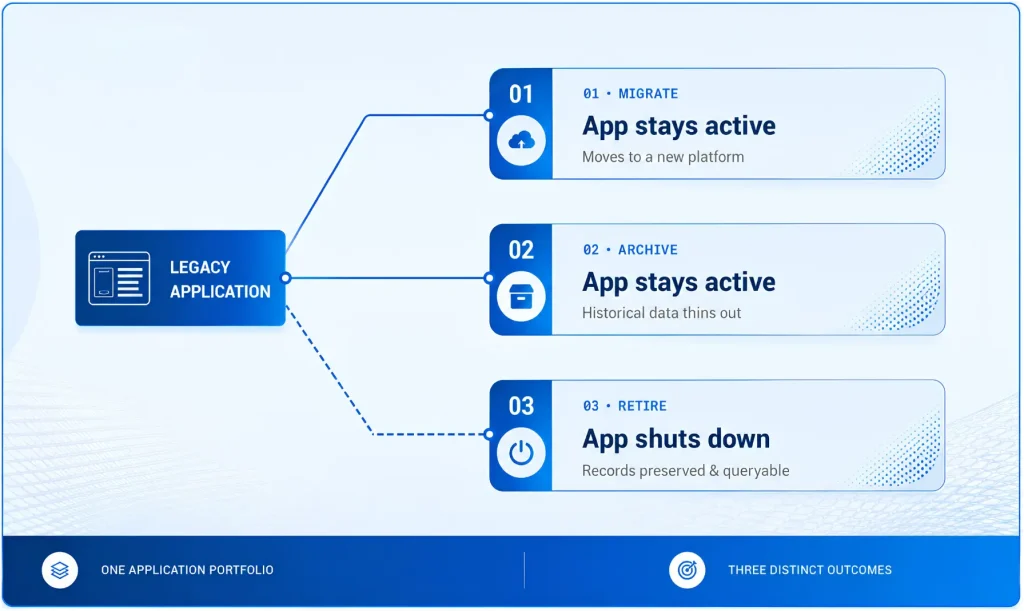
Organizations reassessing their application portfolios typically consider three strategies — migration, archiving, and retirement — and often treat them as interchangeable. They aren’t. This brief defines each strategy, shows when to use it, and explains why an archive-first approach reduces the cost and risk of every modernization program.
The Growing Challenge of Legacy Applications
Organizations today are under constant pressure to modernize their IT environments. Cloud adoption, digital transformation initiatives, mergers and acquisitions, and evolving compliance requirements are forcing enterprises to reassess their application portfolios. Yet many continue to maintain dozens or even hundreds of legacy applications that consume valuable IT resources while delivering limited business value.
These systems often remain operational not because they support active business processes, but because they contain historical data needed for audits, regulatory compliance, customer service, or occasional reporting. As a result, organizations spend significant amounts on infrastructure, licensing, support contracts, and maintenance simply to preserve access to aging data.
|
$27.5B → $67.9B |
The global application modernization market is projected to grow from $27.46 billion in 2026 to $67.91 billion by 2031 — reflecting the urgency enterprises place on modernizing aging applications and infrastructure. (Mordor Intelligence, 2026) |
When evaluating modernization strategies, organizations typically consider three options: application migration, data archiving, and application retirement. While these approaches are often discussed together, they serve very different business objectives. Understanding when and how to use each strategy is critical to reducing costs, mitigating risks, and accelerating modernization initiatives.
Understanding the Three Strategies
Application Migration
Application migration involves moving an application, its data, and its workloads from one environment to another. This may include migrating a legacy application to the cloud, upgrading to a newer platform, or transitioning from one enterprise application to another.
The goal of migration is to preserve and modernize the application so it can continue supporting business operations while benefiting from improved performance, scalability, and maintainability
Data Archiving
Data archiving focuses on moving inactive or historical data from production systems into a secure, lower-cost repository while maintaining accessibility, governance, and compliance controls.
Rather than keeping years of historical records in expensive production environments, organizations can archive infrequently accessed data while reducing storage costs and improving application performance.
Application Retirement
Application retirement involves decommissioning applications that are no longer needed for daily business operations while preserving their historical data and business records.
Instead of maintaining obsolete systems solely for occasional inquiries, audits, or compliance requirements, organizations can retire the application and provide secure access to historical information through a centralized archive platform.
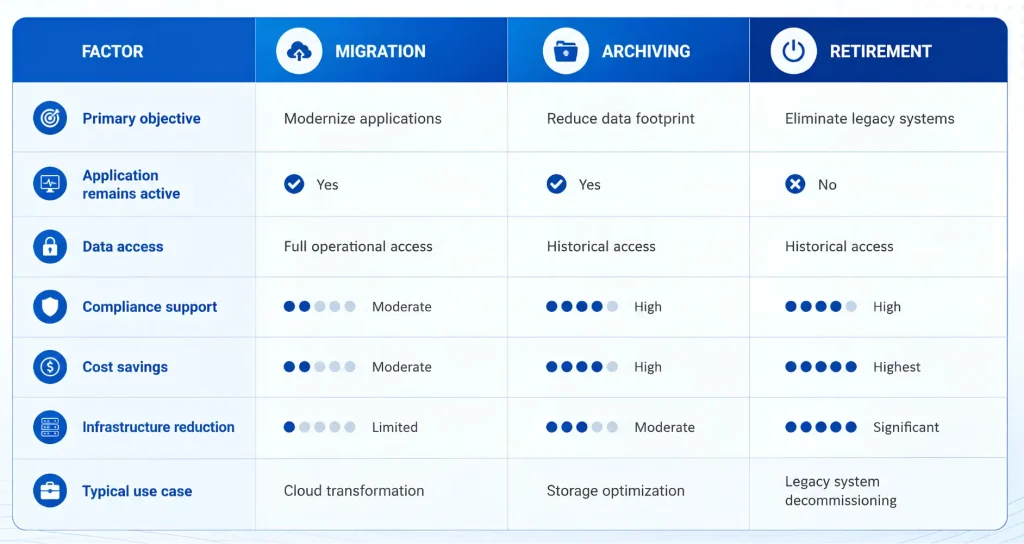
Migration vs Archiving: Key Differences
Migration focuses on preserving operational applications, and archiving focuses on managing historical data efficiently. Application retirement goes a step further by eliminating obsolete systems entirely while maintaining access to their information.
When Should You Migrate, Archive, or Retire?
Migrate When
Migration is the right choice when the application continues to support critical business functions and remains strategically important to the organization.
Common migration scenarios include:
- Cloud transformation initiatives
- ERP modernization projects
- Data center exits
- Platform upgrades
- Performance and scalability improvements
If users actively depend on the application for daily operations, migration is often the preferred path.
Archive When
Archiving is appropriate when the application remains active, but large volumes of historical data no longer need to reside in production environments.
Organizations should consider archiving when:
- Databases continue to grow rapidly
- Historical records are rarely accessed
- Storage costs are increasing
- Application performance is impacted by data volume
- Compliance requirements demand long-term retention
Archiving helps organizations optimize infrastructure while maintaining governed access to historical information.
Retire When
Application retirement becomes the best option when the application itself no longer provides operational value, but its data must remain accessible.
Common retirement indicators include:
- The application has been replaced by a newer system
- Licensing and maintenance costs exceed business value
- Vendor support has ended
- Security risks continue to increase
- The application is retained solely for historical reference
In these situations, retirement eliminates unnecessary costs while preserving business records for future needs.
Why Migration and Application Retirement Are Often Confused
One of the most common misconceptions in modernization projects is treating migration and application retirement as interchangeable strategies.
“Migration modernizes an application. Retirement eliminates an application.”
For example, migrating from SAP ECC to SAP S/4HANA is a migration project because the business process continues on a new platform. In contrast, consider a legacy CRM system that has already been replaced by Salesforce. If users no longer require the original CRM for daily operations but still need access to historical customer records, the objective is not migration—it is application retirement.
Attempting to migrate obsolete applications often increases project complexity, costs, and timelines without delivering meaningful business value. Organizations should first determine whether an application still needs to operate before deciding to migrate it.
Archive-First Modernization: Reducing Migration Costs and Risks
One of the biggest challenges in modernization initiatives is the tendency to migrate everything. Over time, enterprise applications accumulate massive volumes of inactive data. Migrating all of this information increases project costs, extends timelines, and introduces unnecessary risks.
An archive-first modernization strategy addresses this challenge by separating active data from historical data before migration begins.
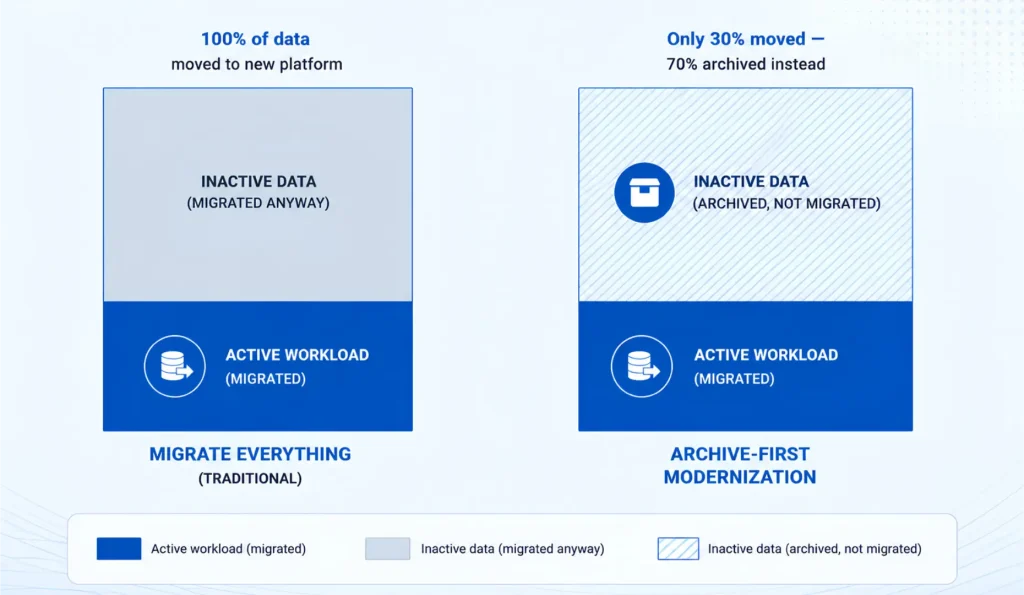
Instead of moving decades of information to a new platform, organizations can:
- Archive inactive and historical data
- Retain governance and compliance controls
- Reduce migration complexity
- Lower cloud storage costs
- Accelerate project timelines
- Improve overall migration success rates
The most successful modernization initiatives combine all three approaches. Organizations archive inactive data, migrate active workloads, and retire applications that no longer provide operational value — evaluating each application individually rather than moving everything by default.
This approach reduces costs, minimizes risk, accelerates transformation initiatives, and creates a more agile and efficient IT landscape. By reducing the volume of data being migrated, organizations can significantly lower modernization costs while improving project outcomes.
Real-World Scenarios
- HR System Consolidation Following a Merger or Acquisition: Following a merger or acquisition, an organization consolidates two HR systems into a single cloud-based Human Capital Management (HCM) platform. Active employee records are migrated to the new system/target system, while historical records from the redundant HR application are archived to meet legal, regulatory, and audit requirements. Once secure access to historical information is established, the duplicate legacy HR system is retired.
- ERP Modernization: A global manufacturer migrating from SAP ECC to SAP S/4HANA moves active business data to the new ERP while archiving historical records beforehand. This reduces migration scope, shortens project timelines, and avoids carrying decades of inactive data into the cloud, lowering ongoing storage, infrastructure, backup, and administration costs while improving long-term system performance.
- Database Cost Optimization: A financial services organization archives ten years of inactive transaction data from production databases. The applications remain operational while storage costs and performance issues are significantly reduced.
- Legacy CRM Decommissioning: A company replaces a legacy CRM platform with Salesforce. Rather than maintaining the legacy system indefinitely for historical inquiries, it retires the application and preserves customer records in a centralized archive, eliminating ongoing infrastructure and licensing costs.
Unified Platforms Deliver Greater Value
Managing migration, archiving, and application retirement with separate tools often leads to fragmented governance, duplicated effort, and higher operational costs. A unified platform streamlines modernization by combining these capabilities within a single governance framework. Beyond core migration, archiving, and retirement functions, look for capabilities such as automated metadata ingestion and cataloging, business glossary and classifications, data ownership and governance workflows, data profiling, quality assessment, lineage, and policy management with audit trails.
Together, these capabilities improve planning, reduce project risk, ensure regulatory compliance, and provide trusted, well-governed data that supports analytics, AI initiatives, and long-term enterprise modernization.
Bottom Line
Migration, archiving, and application retirement are not competing strategies—they are complementary approaches that address different stages of the application lifecycle. The most successful modernization programs determine which applications should be modernized, which data should be archived, and which systems can be safely retired. By combining these strategies within a unified data management framework like Solix Common Data Platform (CDP), organizations can reduce technical debt, control costs, improve compliance, and accelerate digital transformation.

Related Posts

Governing the AI log explosion: why every enterprise needs an intelligent archival strategy

Sunsetting Legacy Systems Without Breaking Business Continuity: The Sequencing That Matters