What is an Enterprise Business Record (EBR)?
An Enterprise Business Record (EBR) is a denormalized, point-in-time snapshot of a business transaction that can include structured, semi-structured, and unstructured data—for example, an invoice, customer record, spreadsheet, and related documents bundled into a single, business-friendly view.
Instead of forcing users to understand dozens of normalized tables and relationships, an EBR presents archived data in the same way the business thinks about it: a complete “record” of a transaction or process outcome, ready for review, audit, or analysis.
Instead of this (technical reality):
- Invoice header table
- Invoice line items table
- Customer master table
- Tax table
- Payment table
- Shipping table
- Attachments table
EBR shows this (business reality):
- A single Invoice view with header + line items + customer + totals + taxes + payment status (and optional attachments)
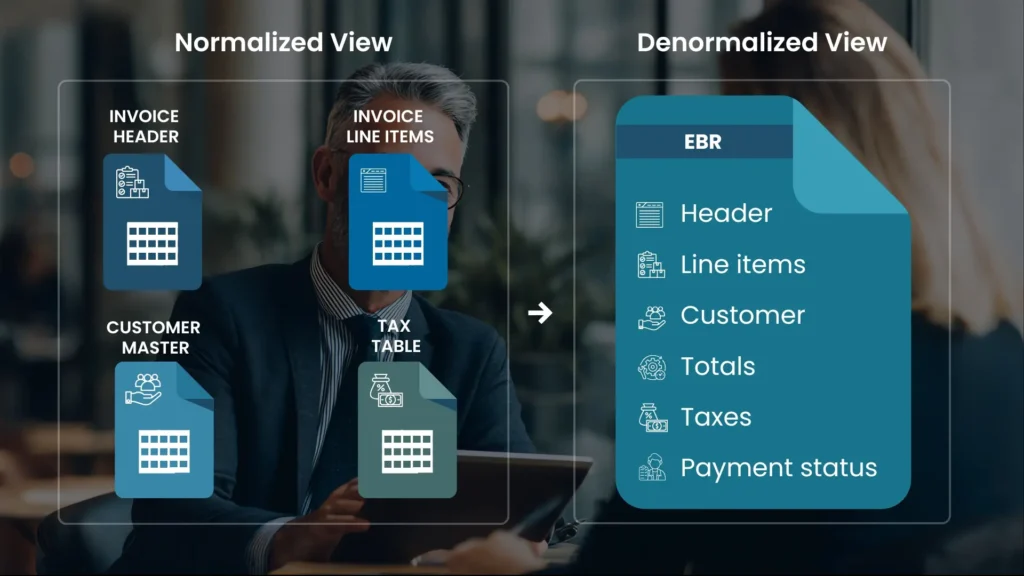
Because it’s denormalized, users receive a complete record in one place, in a format that resembles the original business document.
How EBRs work (conceptually)
EBRs typically organize archived application data into “business objects” by:
- Capturing the right transaction scope (e.g., one invoice, one claim, one purchase order)
- Combining related entities into one view (header + line items + parties + totals + status)
- Including supporting content when needed (reports, exported files, attachments)
- Exposing the record for retrieval so teams can quickly find the exact business object they need (rather than reconstructing it manually)
Importance of EBR
EBR is important because it turns “archived data” into “usable business records” after an application is retired. Key reasons organizations rely on EBRs:
- Self-service access for business users: Users can view a complete business record (like an invoice) without IT having to write custom queries.
- Faster audit and compliance response: EBRs provide quick, well-structured access to complete transactional data, which is exactly what audits and regulatory requests demand.
- Better context and clarity: A denormalized snapshot reduces confusion caused by scattered tables and missing “business form” context.
- Supports analytics and investigation: EBRs are built to support both regulatory and analytic use cases by presenting the whole transaction in one place.
- Reduces dependency on legacy applications: EBRs help teams avoid “reviving” old applications just to view historical records.
Use cases for EBR
Across application retirement and enterprise archiving programs, EBRs are commonly used for:
- Finance (Invoices, credit notes, statements): Finance teams can pull up a complete invoice record—header, line items, taxes, totals, and payment status—in one view, without relying on the retired application UI or IT-built queries. This speeds up dispute resolution, reconciliations, and historical reporting.
- Procurement (Purchase orders, receipts, vendor transactions): Procurement can retrieve a full PO record with related receipts and supplier details to validate past purchases and support vendor audits. It also helps teams answer “what was ordered vs. what was received” quickly during investigations.
- Customer operations (Customer profiles, order/service history): Support teams can access a customer’s historical transactions in a familiar, form-like view to resolve tickets faster and reduce escalations. EBRs help agents respond confidently even when the original system is no longer available.
- Legal and compliance (Audits, regulatory requests, eDiscovery support): Legal and compliance teams can locate and review complete business records (e.g., a specific invoice or claim) with the right context for audits, litigation holds, and regulatory inquiries. This reduces time spent assembling evidence from multiple tables and sources.
- Cross-team reporting (Consistent record views across departments): EBRs standardize how different teams view the same historical transaction, avoiding mismatched interpretations across finance, operations, and compliance. This consistency is especially useful in multi-region enterprises where processes and reporting formats vary.
How EBR in Solix Application Retirement best suits the purpose
In Solix Application Retirement, EBRs are designed to preserve access to business-critical records even after the legacy application is shut down. How Solix EBRs fit the “retire the app, keep the value” goal:
- Business-form templates for usability: Solix EBRs organize data into templates (e.g., invoices, customer data, spreadsheets, and documents) to give users easy self-service access to complex business processes.
- Complete transactional snapshot: Solix defines EBR as a denormalized, point-in-time snapshot that can include structured/semi-structured/unstructured elements—so teams can retrieve the full transaction context without stitching pieces together.
- Optimized for retrieval and integration: Solix EBRs can be text-searched or queried, and can be made available to authorized third-party applications through APIs, helping organizations support audits, reporting, and downstream needs without the legacy system.
In short: Solix EBRs reduce the “access gap” that usually blocks application retirement—by keeping business records understandable, searchable, and usable after decommissioning.
In conclusion, an Enterprise Business Record (EBR) is one of the most practical ways to preserve business continuity during application retirement: it keeps historical transactions accessible in familiar formats, supports compliance and analytics, and removes the need to maintain legacy application UIs just to view old records.
Frequently Asked Questions (FAQs) for Enterprise Business Record (EBR)
What does “denormalized” mean in an EBR?
It means related data from multiple tables/sources is combined into a single business record view, so users don’t need complex joins to understand one transaction.
Is an EBR the same as a report (PDF/Excel)?
Not exactly—reports are outputs, while an EBR is a structured business record view that can include reports/documents as part of the complete transaction context.
Can an EBR include documents and files along with database records?
Yes. EBRs includes structured, semi-structured, and unstructured elements (like spreadsheets and documents) within the same business record.
Can EBRs be searched?
Yes. Solix notes EBRs can be text-searched or queried, helping users retrieve the right record faster.
Why use EBRs in an application retirement project?
Because EBRs preserve easy access to complete historical transactions after the legacy app is decommissioned—supporting audit, compliance, and business self-service.