Quick Definition
Data archiving is the systematic movement of inactive data from production systems to governed, lower-cost long-term storage. Organizations archive data to reduce storage and licensing costs, maintain compliance with regulatory retention mandates, and improve production system performance. Archived data remains accessible for audit, legal, and reporting purposes without burdening active environments.
Why Data Archiving Matters in 2026
Enterprise stored data is growing at roughly 30% annually, and an estimated 80% of that data will require long-term archival retention (IDC, 2024). Gartner projects that large enterprises will triple their unstructured data capacity by 2026 compared to 2022 (Gartner, 2025). That growth compounds a problem most enterprises already have: production databases bloated with records nobody queries, running on full-price licenses, absorbing backup windows, and slowing batch jobs. Without a structured archiving strategy, organizations pay production-grade costs for dormant data while accumulating compliance liability with every missed retention deadline. Archiving is not optional housekeeping. It is a prerequisite for modernization, cost control, and compliance.
What Is Data Archiving?
Data archiving goes beyond moving old files to cheaper disks. In enterprise environments, archiving is the mechanism that enables application retirement. When an organization decommissions a legacy ERP system, the data inside that system does not disappear — regulations, litigation holds, and business continuity requirements demand that it remain accessible. Archiving extracts that data, loads it into a governed repository, and makes it independently queryable without keeping the source application online.
From years inside Veritas during the enterprise data protection wave, the operational pattern is clear: archives that are not independently queryable become liabilities, not assets. Archiving also operates under information lifecycle management policies. Each data class carries its own retention schedule — financial transactions may require seven years, healthcare records a decade or more, and certain government records indefinitely. A mature archiving practice enforces these schedules automatically, applying defensible deletion when retention expires and placing legal holds when litigation demands preservation.
The shift from tape-based cold storage to queryable archive platforms has changed what archiving delivers. Modern archive repositories serve compliance teams running audit queries, analysts building historical trend models, and AI workloads that need broad historical datasets for training. Archiving is no longer a write-once-forget operation. It is an active layer in the enterprise data governance stack.
Data Archiving vs Related Terms
Data Archiving vs Data Backup
Backup creates point-in-time recovery copies of active production data. Its purpose is disaster recovery — restoring systems to a known state after failure. Archiving moves inactive data out of production permanently and governs it under retention policies. Backup protects against data loss; archiving manages data that is no longer active but must be retained and accessible for compliance or business purposes.
Data Archiving vs Data Migration
Data migration transfers data between active production systems — for example, moving from an on-premises Oracle EBS instance to a cloud-hosted ERP. Both source and target are live, operational environments. Archiving moves data out of active systems into long-term governed storage. Migration keeps data in production; archiving removes it from production while preserving queryability.
Data Archiving vs Information Lifecycle Management
Information lifecycle management is the policy framework that defines how data is classified, retained, accessed, and eventually deleted across its entire lifespan. Data archiving is one execution mechanism within that framework. ILM sets the rules — which data classes exist, how long each is retained, who can access what. Archiving carries out the physical movement and governance of data according to those rules.
How Data Archiving Works
- Identify and Classify Inactive Data — Scan production systems (SAP, Oracle, custom databases) to identify records that meet inactivity thresholds. Classify data by type, regulatory domain, and business unit. Standards like ISO 15489 provide classification frameworks that align archiving practice with records management requirements, emphasizing authenticity, reliability, integrity, and usability of retained records.
- Define Retention and Access Policies — Assign retention schedules, access controls, and legal hold triggers to each data class. Financial transaction records may carry a seven-year retention under SEC and FINRA rules. Healthcare records follow HIPAA minimums. Security controls for archived data map to NIST SP 800-53 (SI-12), which requires organizations to manage and retain information within systems in accordance with applicable laws, directives, and operational requirements.
- Extract, Transform, and Load into a Governed Archive — This is where enterprise archiving diverges from simple cold storage. The archive repository must be queryable and auditable independent of the source application. When an organization retires a legacy SAP ECC system after migrating to S/4HANA, the archived ECC data must remain searchable by compliance, legal, and finance teams — without requiring the ECC application to stay online. This capability is what enables application retirement and the reclamation of associated licenses, infrastructure, and support contracts. Without it, organizations keep dormant applications running at full cost solely to satisfy occasional data access requests. Gartner’s 2025 Magic Quadrant for Digital Communications Governance and Archiving Solutions — the successor to the Enterprise Information Archiving MQ — evaluated 14 vendors and reflects a market shift toward integrated governance, retention, and compliance workflows rather than simple storage-tier archival (Gartner, 2025).
- Validate Archive Integrity and Apply Access Controls — Run automated checksums and reconciliation to confirm that every record in the archive matches the source. Apply role-based access controls so that only authorized users can query, export, or modify archived records. Integrity validation is not optional — regulators expect provable chain of custody.
- Monitor, Audit, and Execute Defensible Deletion — Once data is archived, the lifecycle continues. Monitor access patterns and retention clocks. When a retention period expires and no legal hold is active, execute defensible deletion with a full audit trail. This step closes the loop on information lifecycle management and reduces the organization’s data liability footprint.
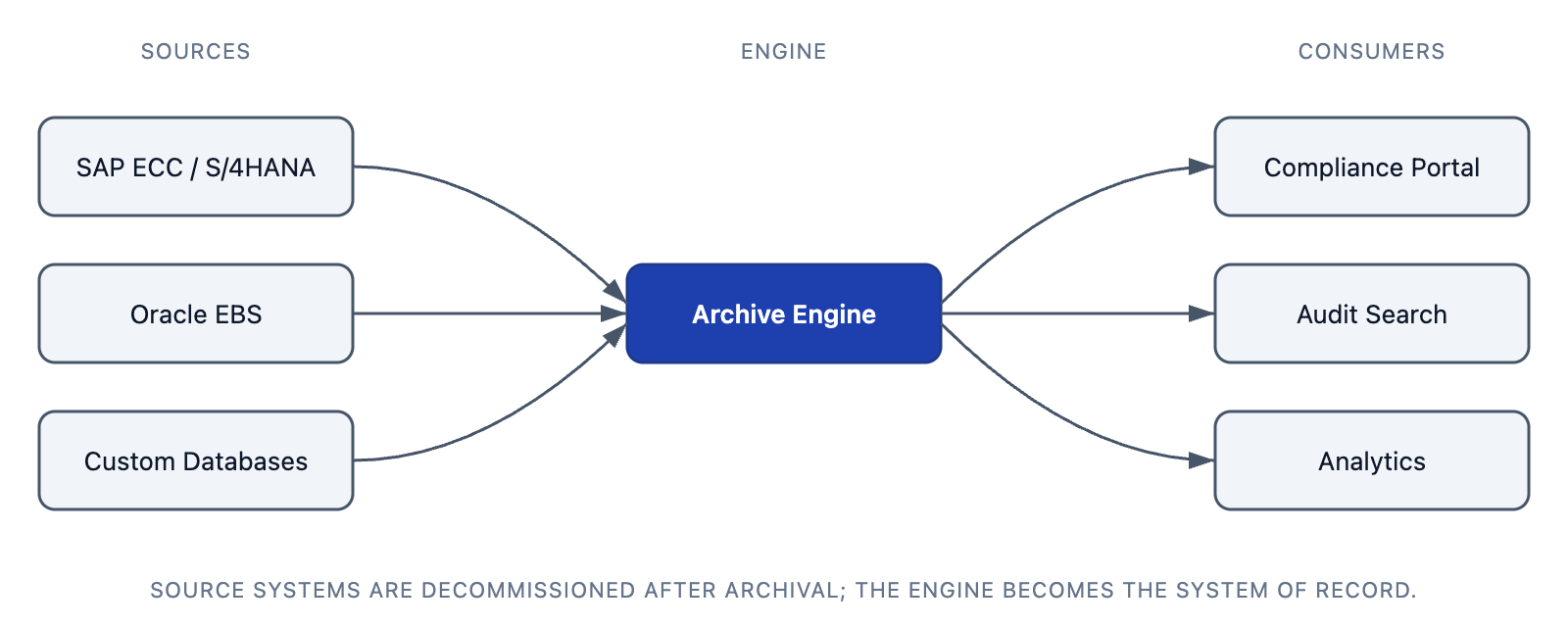

Table: Archive storage approaches compared — the right choice depends on retrieval needs, compliance obligations, and cost constraints.
| Attribute | Queryable Archive | Offline Archive | Cold Storage | Deletion |
|---|---|---|---|---|
| Accessibility | On-demand, sub-second queries | Request-based, hours to days | Manual retrieval, days to weeks | Permanently removed |
| Cost Profile | Moderate — indexed storage + compute | Low — tape or nearline | Lowest — deep archive tiers | Zero ongoing cost |
| Compliance Fit | Strong — audit-ready, legal hold capable | Partial — slow retrieval risks SLA breach | Weak — retrieval delays may violate mandates | Only after retention expiry |
| Retrieval Latency | Seconds | Hours | Days | N/A |
| App Retirement | Fully enables decommission | Partial — may need source for complex queries | Does not enable — data inaccessible without restore | N/A |
Industry Use Cases
Healthcare
Hospitals and health systems archive electronic health records from decommissioned EHR platforms to meet HIPAA retention requirements, often spanning a decade or more. Archived patient records must remain accessible for continuity of care, audit, and legal discovery without maintaining legacy clinical applications.
Financial Services
Banks and broker-dealers archive transaction records, trade confirmations, and communications to satisfy SEC, FINRA, and Basel III retention mandates. Archiving enables institutions to retire legacy trading and core banking platforms while keeping seven or more years of records queryable for regulatory examination.
Manufacturing
Manufacturers archive MES, ERP, and quality-system data during plant consolidations and system upgrades. When a manufacturer migrates from Oracle EBS to a cloud ERP, archiving historical production, lot-tracking, and supplier records ensures traceability without keeping the legacy system operational.
Public Sector
Consider, for illustrative purposes, NARA — the U.S. National Archives and Records Administration — which manages electronic records from decommissioned agency systems spanning multiple decades and technology generations. When a federal agency retires a legacy records system without a queryable archive, the failure pattern is predictable: FOIA response times stretch from days to weeks as staff manually reconstruct data from flat exports, backup tapes, or paper printouts. Public-records litigation risk escalates, and audit trails across system generations break.
By contrast, an illustrative example of the win scenario: when schema-fidelity archive ingestion is implemented correctly, the agency achieves sub-second FOIA retrieval against decades of archived records, the audit trail remains intact across system generations, and the legacy system is fully decommissioned — freeing infrastructure budget and reducing the attack surface. Federal agencies follow NARA records management directives under 44 U.S.C. Chapter 29 to set retention schedules and disposition authorities.
Energy
Energy companies archive SCADA, operational, and environmental compliance data to meet NERC, EPA, and state regulatory requirements. Archiving historical operational data from decommissioned control systems preserves the audit trail without maintaining obsolete infrastructure.
Key Enterprise Benefits
- Reduced storage and licensing costs — Moving inactive data off production systems lowers database licensing fees, storage costs, and infrastructure overhead. With enterprise data growing at 30% annually (IDC, 2024), the cost gap between production-tier and archive-tier storage compounds every year.
- Improved production system performance — Smaller production databases run faster queries, shorter batch windows, and more responsive applications.
- Regulatory compliance — Automated retention schedules and defensible deletion satisfy audit requirements across jurisdictions, from HIPAA to SEC to NARA.
- Legacy application retirement — Archiving data independently of the source application enables decommissioning of costly legacy systems and reclamation of licenses.
- Reduced attack surface — Removing dormant sensitive data from production environments decreases exposure in the event of a breach.
Common Challenges and Mitigations
| Challenge | Mitigation |
|---|---|
| Data volume and complexity across heterogeneous source systems | Prioritize archiving by cost or risk — start with the highest-license or highest-regulation systems first. |
| Maintaining queryability after archive | Use archive platforms with semantic query layers that provide native access to archived data independent of the source application. |
| Regulatory uncertainty on retention periods | Build flexible, policy-driven retention schedules reviewed by legal counsel. Update as regulations change. |
| Organizational resistance from application owners | Involve stakeholders early in the archiving plan. Demonstrate decommission ROI — license savings, reduced maintenance, lower risk. |
| Data integrity validation at scale | Automate checksums and source-to-archive reconciliation during every archive load cycle. |
How Solix Helps Enterprises Operationalize Data Archiving
Solix CDP gives enterprises a single platform to archive structured data from SAP, Oracle, and custom applications, retire the source systems, and govern the archived records under retention and access policies. What sets the platform apart is its Business Object Knowledge Graph — a semantic layer that encodes deep, application-specific knowledge into the archive itself. After the legacy application is fully decommissioned, users query archived data in plain English and get governed answers in seconds, without SQL, without restoring the source system, and without keeping dormant licenses active (Solix, 2026). For a team running SAP S/4HANA on top of two decades of legacy SAP ECC data, this means consolidating archived records into a queryable repository, shrinking the active database footprint, and meeting retention obligations without keeping a dormant ERP system online. Learn more about Solix CDP.
Frequently Asked Questions
What is data archiving used for?
Data archiving is used to move inactive records from production systems into governed long-term storage. Organizations use it to reduce storage and licensing costs, comply with regulatory retention mandates, improve production system performance, and enable the retirement of legacy applications whose data must still be accessible.
How does data archiving work?
Data archiving works by identifying inactive records in production systems, classifying them by retention policy, extracting and loading them into a governed archive repository, validating integrity, and applying access controls. The archived data remains queryable for compliance, legal, and analytical purposes without requiring the original source application.
What are the benefits of data archiving?
Key benefits include lower storage and licensing costs, faster production system performance, regulatory compliance through automated retention and deletion, the ability to retire legacy applications, and a reduced security attack surface from removing dormant data out of production environments.
Data archiving vs data backup — what is the difference?
Data backup creates recovery copies of active data for disaster recovery. Data archiving permanently moves inactive data to governed long-term storage for retention and compliance. Backup is about restoring systems after failure. Archiving is about managing data that is no longer active but must be retained and accessible.
Related Glossary Terms
- Application Retirement
- Information Lifecycle Management
- Data Governance
- Database Archiving
Trademark Notice
Product names, logos, brands, and other trademarks referenced on this page are the property of their respective trademark holders. References to third-party products are for descriptive and informational purposes only and do not imply affiliation, endorsement, or sponsorship by the trademark holders. Solix Technologies is not affiliated with, endorsed by, or sponsored by any third party referenced on this page unless explicitly stated.