Bulk Inserts

What are Bulk Inserts?

Bulk inserts refer to a database operation that involves inserting many records into a database table in a single operation, rather than inserting each record individually. This method is commonly used to improve performance and efficiency when dealing with substantial data.

How Bulk Inserts Work

The specific implementation of bulk inserts varies depending on the DBMS. However, the general concept involves:

  • Data Preparation: The data is typically formatted in a specific way, often a flat file like CSV or a proprietary format.
  • Bulk Insert Command: A special command provided by the DBMS is used to initiate the bulk insert operation. This command specifies the target table and the location of the data source.
  • Data Loading: The DBMS engine efficiently loads the data from the source into the table, optimizing the process for speed and efficiency.

Methods of Bulk Insert

  • SQL Statements: Many database management systems (DBMS) provide specific SQL commands for bulk inserts for multiple rows in SQL Server and MySQL.
  • Utility Tools: Tools like bcp (Bulk Copy Program) in SQL Server, COPY command in PostgreSQL, and LOAD DATA INFILE in MySQL are designed for bulk data loading.
  • APIs and Libraries: Programming languages often provide APIs or libraries (like JDBC for Java, psycopg2 for Python with PostgreSQL) that support bulk insert operations.

Use Cases for Bulk Insert

  • Data Migration: Transferring large datasets from one system to another.
  • Data Warehousing: Loading large volumes of data into a data warehouse for analysis.
  • ETL Processes: Extract, Transform, Load (ETL) workflows where data from various sources is consolidated into a single database.

Benefits of Bulk Inserts

  • Improved Performance: Bulk inserts significantly reduce the overhead associated with individual INSERT statements. This can lead to substantial performance gains when dealing with large datasets.
  • Reduced Server Load: By grouping multiple inserts into a single operation, bulk inserts minimize the number of round trips between the application and the database server, reducing the overall load.
  • Faster Data Loading: Bulk inserts can significantly speed up the process of importing data from external sources like CSV files.

Best Practices with Bulk Inserts

  • Batch Size Management: Adjusting the batch size to optimize performance and avoid memory issues.
  • Error Handling: Implementing robust error handling to manage potential failures during the bulk insert process.
  • Index Management: Disabling indexes during bulk inserts can speed up the operation, but indexes should be rebuilt afterward to maintain query performance.

FAQ

How can I handle errors during a bulk insert operation?

Implement robust error handling by using try-catch blocks in your database scripts or application code. You can also log errors to an error table or file for further analysis. For example, some DBMS allow you to skip faulty rows or redirect them to an error table during a bulk insert operation.

Is it necessary to disable indexes before performing a bulk insert?

Disabling indexes before a bulk insert can improve the speed of the operation because the database does not have to update the indexes for each inserted row. However, it is essential to rebuild the indexes afterward to maintain query performance. This approach is particularly useful when inserting a large volume of data.

What batch size should I use for a bulk insert?

The optimal batch size for a bulk insert depends on various factors, including the available memory, the specific DBMS, and the nature of the data being inserted. It’s often recommended to experiment with different batch sizes to find the best balance between performance and resource usage. In general, larger batches reduce the overhead of multiple transactions but may consume more memory.
Change Data Capture

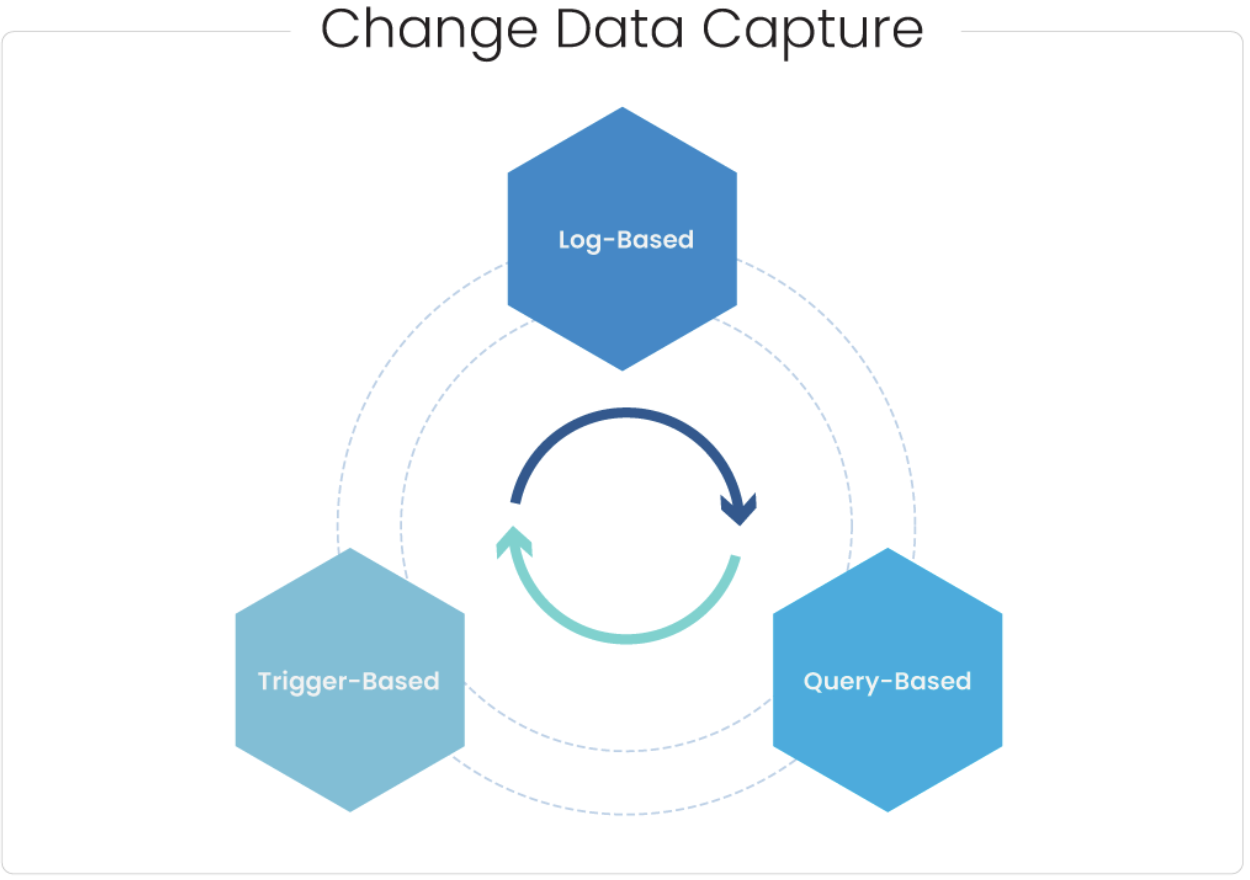
Change Data Capture

What is Change Data Capture (CDC)?

Change Data Capture (CDC) refers to the process of identifying and capturing changes made to data in a database over a specific period, in real-time or near-real-time. Instead of taking periodic snapshots of the entire database, CDC captures the delta – the specific changes that occur – keeping downstream systems constantly updated.

Why use CDC?

Imagine your enterprise relies on customer data in multiple systems: a CRM for managing interactions, a data warehouse for analysis, and a marketing platform for targeted campaigns. Without CDC, any change in a customer’s address, phone number, or purchase history might take hours or even days to reflect across all systems. This data lag can create inconsistencies, hindering accurate reporting, personalized marketing, and efficient customer service.

Key benefits of CDC

  • Real-time data synchronization: Ensures all systems have the latest information, enabling faster decision-making and reactive workflows.
  • Enhanced data accuracy and consistency: Reduces data discrepancies and improves data quality across your organization.
  • Streamlined data integration: Simplifies moving data between various systems, accelerating analytics and reporting.
  • Reduced workload and resource utilization: Eliminates the need for full data refreshes, saving time and infrastructure costs.

When to use CDC?

CDC is particularly valuable in scenarios where:

  • Data changes frequently: Customer information, inventory levels, financial transactions, or sensor readings benefit from immediate updates.
  • Downstream systems rely on real-time data: E-commerce platforms, personalized recommendation engines, and fraud detection systems need instantaneous data feeds.
  • Data consistency is critical: Ensuring all systems operate on the same accurate data is crucial for financial reporting, regulatory compliance, and customer trust.

Types of CDC Approaches

  • Log-based CDC: Monitors database logs to identify data modifications.
  • Trigger-based CDC: Leverages database triggers to capture changes as they occur.
  • Query-based CDC: Executes specific queries at intervals to identify changes.

CDC acts as a data bridge, keeping your systems aligned and your information flowing smoothly. Whether you’re running a dynamic restaurant or a data-driven enterprise, CDC ensures everyone is working on the latest data for optimal results.

FAQs

Is CDC secure?

CDC can be secure, but it’s important to implement proper security measures. This includes controlling access to the captured data changes and ensuring they are encrypted in transit and at rest.

Does CDC impact database performance?

The impact of CDC on database performance can vary depending on the implementation method and the volume of data changes. Log-based CDC can have a minimal impact, while trigger-based CDC might have a more noticeable effect. It’s crucial to properly configure CDC to minimize performance overhead.

How does CDC differ from traditional ETL (Extract, Transform, Load)?

Traditional ETL typically extracts data in full batches at regular intervals. CDC, on the other hand, focuses on capturing only the changes that occur in the data, providing a more real-time and efficient approach to data integration.

What are some limitations of CDC?

CDC might not be suitable for all scenarios. For instance, if data changes are very complex or the source database doesn’t support CDC mechanisms, alternative approaches like full data extracts might be necessary.

ETL (Extract, Transform & Load)

What is ETL?

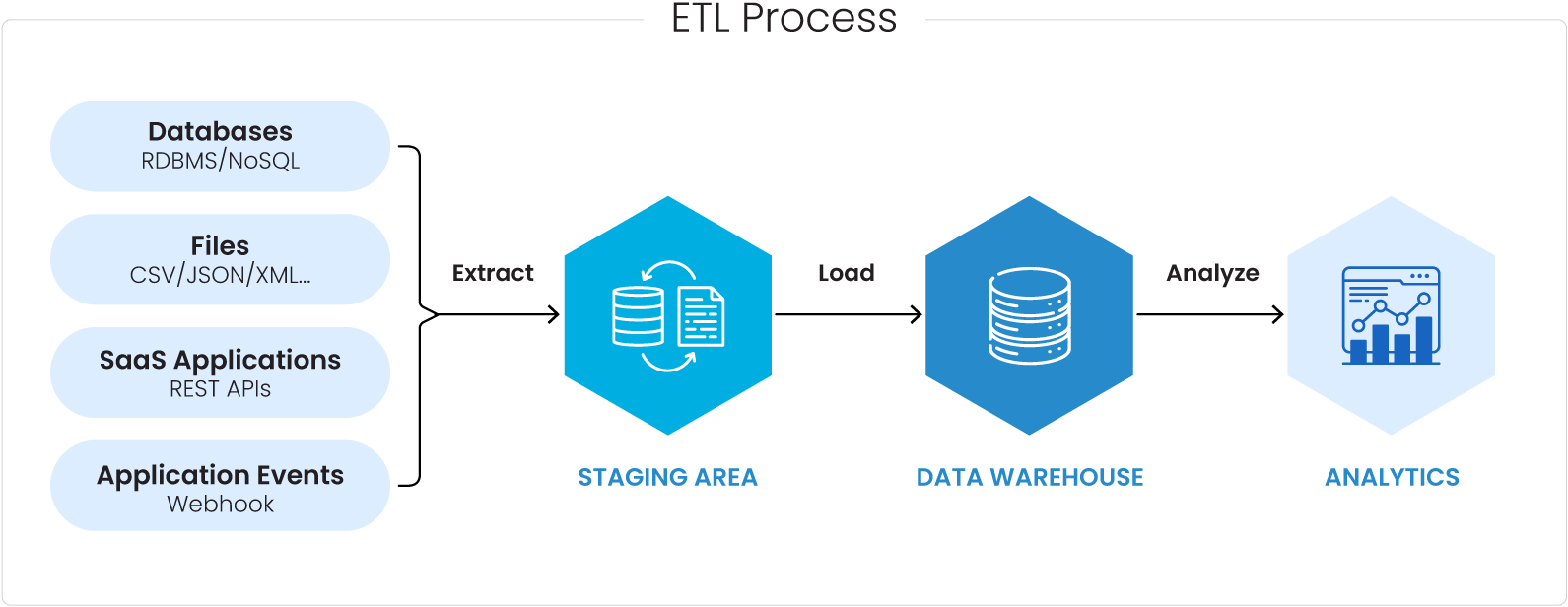
ETL Process

ETL (Extract, Transform, Load) is a critical Data Integration process that ensures the smooth flow of data from various sources to a target destination, typically a data warehouse or other target systems. In an ETL process, data is ingested from multiple sources, and it is cleaned, enriched with metadata, and transformed before it is integrated for use in Data Analytics, BI, and Data Science use cases.

Extract

ETL processes extract data from various sources, including databases (relational and non-relational), APIs, flat files (CSV, Excel), CRM/ERP systems, web pages, and more.

ETL systems often incorporate CDC mechanisms to identify and extract only the data that has changed since the last extraction, reducing processing time and resource requirements.

Transformation:

The transformation phase of ETL contains a series of operations to ensure data quality, consistency, and suitability for analysis. Key aspects of the transformation stage include:

Data Cleansing

  • After the data is ingested from various sources, missing data is dealt with by either imputing values, removing records with missing values, or applying statistical methods to estimate missing values.
  • Duplicate data is identified and removed to improve data integrity and accuracy while ensuring that data follows a consistent format, unit of measurement, and naming conventions, making it easier to analyze and compare.
  • Newer columns or variables are created based on existing data through calculations, concatenations, or other operations. Metadata, categories, or classes are added to the tables for better organization and analysis.
  • Data Transformation: Data types are converted to ensure compatibility with the target system, such as changing text to numeric or date formats which is then structured to eliminate redundancy (normalization) or combine data from multiple sources into a table (denormalization.

Load

In the final step, transformed data is loaded into the target destination, often a data warehouse. Loading involves organizing the data in a way that supports efficient querying and analysis. 

Key ETL Use Cases

ETL can be seen very useful in the following scenarios

  • Data Integration for Business Intelligence: ETL is widely employed to integrate data from diverse sources into a central repository, providing a unified and structured dataset for business intelligence and downstream analytics tools.
  • Data Migration and System Upgrades: ETL plays a crucial role in seamlessly transferring data from old systems to new ones. This ensures a smooth transition without data loss or disruption to business operations.
  • Regulatory Compliance and Reporting: Organizations can use ETL to aggregate and transform data in a way that complies with industry regulations like GDPR and HIPAA
  • Data Quality Improvement: By applying transformations and validation rules during the ETL process, organizations can identify and rectify data anomalies, ensuring high-quality information for analysis and decision-making. This is particularly crucial in industries where data accuracy is paramount, such as finance and healthcare, for regulatory compliance.
  • Master Data Management (MDM): ETL supports Master Data Management initiatives by integrating and consolidating master data from various sources. This ensures that there is a single, accurate, and consistent version of key business entities, such as customers or products, across the organization.

Differences between ETL and ELT

The key distinction between ETL (Extract, Transform, Load) and ELT (Extract, Load, Transform) lies in the sequence of data processing.

In ETL, data is extracted from source systems, then transformed to meet the desired structure, and finally loaded into the target destination. This approach is beneficial when data transformation requires significant processing power or a need to consolidate data from various sources before loading.

On the other hand, ELT reverses this order, with data being extracted and loaded into the target system first and transformation occurring within the destination. ELT is advantageous when the target system, often a data lake or modern data warehouse, can handle the processing power required for transformations efficiently.

ELT is often associated with scalable data lake and lakehouse architectures, while ETL has traditionally been linked with data warehouses. The choice between ETL and ELT depends on factors such as data volume, processing requirements, and the architecture of the underlying systems.

FAQs

What are the challenges of ETL?

ETL can have the following challenges:

  • Data complexity: Dealing with diverse data formats and structures can be complex.
  • Data quality issues: Ensuring data accuracy and completeness requires ongoing effort.
  • Performance optimization: ETL processes can be resource-intensive, especially for large datasets.

How can I ensure the success of my ETL project?

  • Clearly define your data requirements and target audience.
  • Choose the right ETL tool for your needs.
  • Implement data quality checks and procedures.
  • Regularly monitor and test your ETL processes.